

A crypto portfolio tracker that does the accounting
Add what you hold by hand, from an exchange's CSV file or from a wallet address. Coinfolytics keeps every trade and works out cost basis, profit and your real return, the way an accountant would.
Updated
How it works
Sign up with Google or an email address. Your dashboard opens on its first step.
Type a coin and an amount, import a CSV file from your exchange, or paste a wallet address.
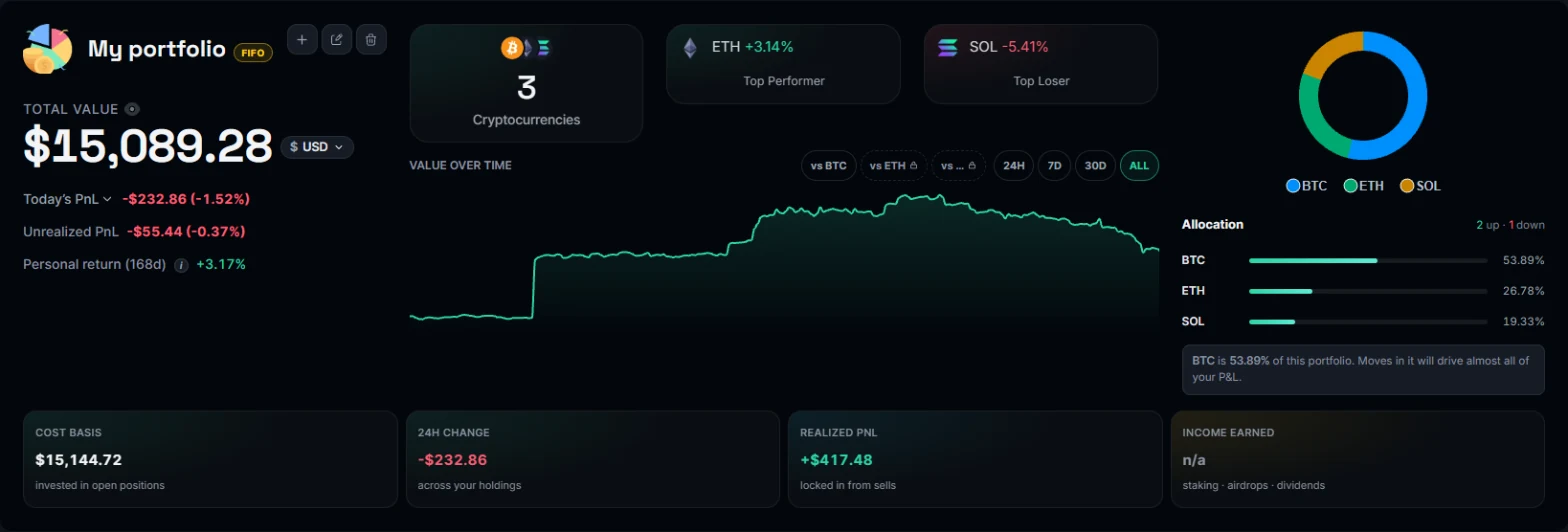
Your value, profit, cost basis and return, live, in your own currency.
What you can see
Every figure comes from your own trades, recomputed whenever you add one.
Today, 7 days, a month, a year or any dates you pick, counted properly: money you put in is never a gain.
Average cost, FIFO, LIFO or HIFO, per portfolio. Realized and unrealized profit for every coin and every sale.
Cost basis methods explainedA money-weighted return that counts when you added and took out money, the industry's standard measure.
Realized gains split into short and long term, and income from rewards, on every plan.
Crypto tax questionsHear when a coin or your whole portfolio crosses your number.
About price alertsSee everything in the currency you pick; each trade keeps the currency it was made in, at official rates.
Who it is for
The same tracker, used in different ways.
- Buying a little at a time. Log each buy in seconds and see your average price and how the whole stack is doing.
- Active traders. Import an exchange file or a wallet and see each sale's profit, the fees and the profit over any period.
- Tax time. Realized gains by short and long term and income from rewards for the year, in your own currency.
Better than a spreadsheet
What a spreadsheet leaves you to do by hand.
- Prices update themselves. Live prices for thousands of coins, and each trade's price at its own moment when you leave it empty.
- Cost basis that holds up. Lots are matched by the method you pick, and a transfer between your own wallets is never counted as a sale.
- Imports in minutes. A whole wallet's history or an exchange file, instead of copying rows.
Ways to add your coins
Built on your trades
Your trades are the record. Holdings, cost and profit are worked out from them every time something changes, so an edit or a late import never leaves a figure out of date.
Every plan, Market included, keeps as many transactions and coins as you add. The Market plan has 1 portfolio; paid plans add more and remove the import limits.